User roles determine what an user may see or do. Every user has a single role, which can be assigned upon account creation or when editing that user.
User roles influence the menu
Currently the portal menu is defined bases on the user role. This can only be altered by Munisense administrators, so contact them if you want to change something.
User roles influence what an user may do
Every role has a list of permissions. These permissions can be turned on and off by users who have the enduser administrator role.
Change user role permissions
- In the menu, click User Roles / (Functieprofielen).
- Click on the key
 icon behind the user role you wish to edit.
 - You can enable/disable the permissions by clicking the checkboxes.
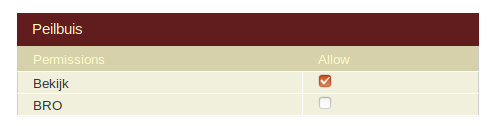
- Changes are automatically saved and applied.
Known issues:
- Some permissions that are not relevant to every type of customer are shown. We are planning to hide these.
Creating a new role
- In the menu, click User Roles / (Functieprofielen).
- View the role that is most similar to the one you want to create
- Click the Copy As / Bewaar Als button on the bottom.
- Choose a new name
- Then you can change the user role permissions.
- Ask Munisense if you want to alter the menu.

0 Comments