If you plan to use a SIM card that was not provided by Munisense you have to change the APN settings in the gateway. If you do not do this, the gateway will not make a mobile connection.
An explanation of what APN is can be found here: Wikipedia APN
Please follow these steps:
- Power off the gateway
- If your gateway if an outdoor gateway (ZGO), screw off the lid/top so you gain access to the SIM tray.
- Make sure the pin code is removed from the SIM card, even if the pin code is for example "0000"! You can use your own mobile phone to do this, just insert the SIM in your phone and remove the SIM pin code. A quick Google search for "how to remove SIM pin" + your mobile phone, should allow you to perform this action.
- Place the SIM card in the gateway, see Placing SIM card.
- Power on the gateway.
- Login to the web interface of the gateway, see Login to the gateway.
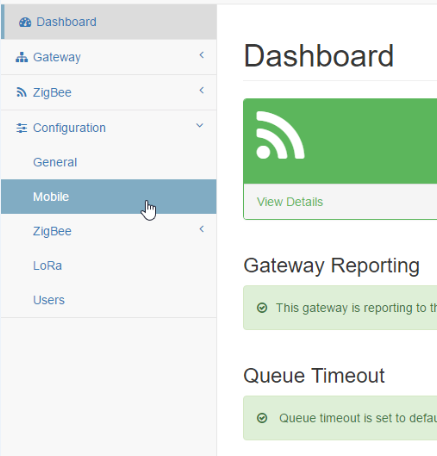
- Go to the Mobile Configuration page.
- Enter your network credentials here. See the website of your mobile provider for these settings.
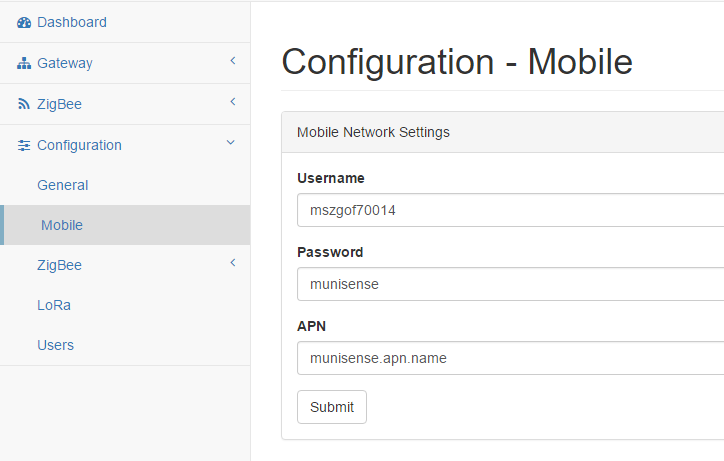
- Remember to click Submit to save your changes.
- Now remove the Ethernet cable from the gateway (if it was attached).
- Visit your portal, open the Network Status page and verify the gateway is sending data.
Here you can find some APN settings for different providers. Is your provider missing? Please contact us so we can add it to this list.
| Provider | Username | Password | APN |
|
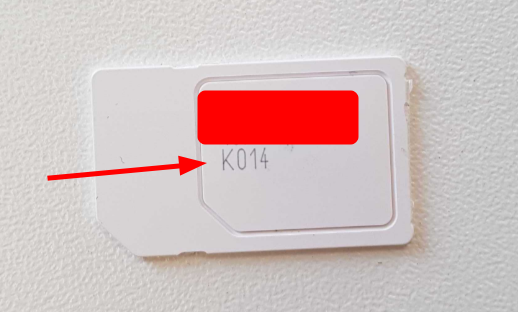
KPN from Munisense (if SIM has K014 on it*) |
internet | internet | public.m2m |
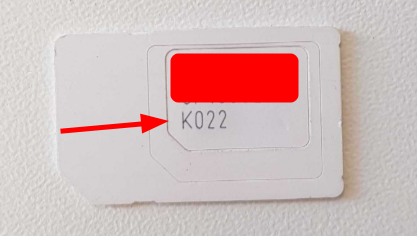
| Old KPN from Munisense (if SIM has K022 on it**) |
internet | internet | kpn.munisense.net |
| Proximus | internet | internet |
internet.proximus.be OR m2minternet.proximus.be |
| T-Mobile | internet | internet | smartsites.t-mobile |
| Vodafone | vodafone | vodafone | live.vodafone.com |
*
**
0 Comments