Interfaces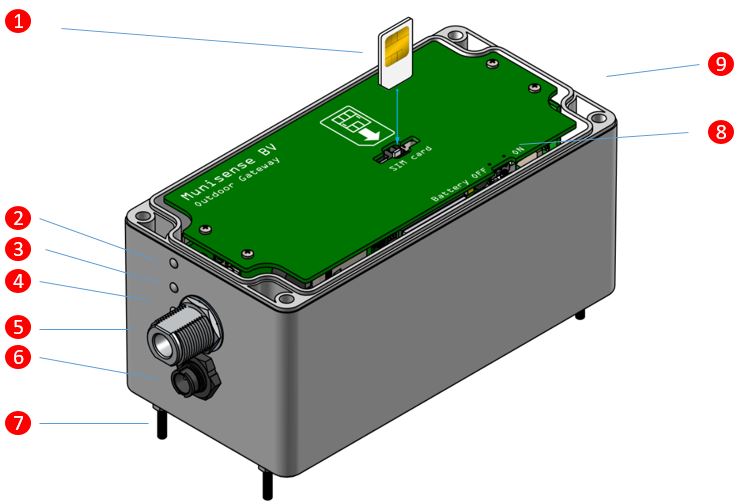
Picture above shows the ZGO, with the lid taken off. You will find the following interfaces:
- SIM card slot. If not delivered with a SIM card than here, you can insert the SIM card of your national provider. Before inserting the SIM card make sure that no power is attached to the device and the battery (8) is switched off. Once the SIM is placed make sure you login to the gateway and have to set the Username, Password and APN for the mobile network to be used. The PIN code on the SIM card should be disabled.
- LED indicator for 34/4G network.
- LED indicator for local Zigbee network.
- LED indicator for power.
- N-Type antenna connector for Zigbee network.
- Connector for charger or solar panel.
- Fixture for mounting plate.
- Battery switch. The device is delivered with the battery switched off. Make sure you switch the battery on, when start using the device. Note: it is not necessary to switch the battery off after using. Only when the device is stored for a long time it is recommended to switch the battery off.
If you have placed your own sim it might be possible that you will need to change the APN in the gateway aswell. For more information about changing the APN please check: https://munisense.zendesk.com/hc/en-us/articles/360001692953-How-do-I-change-the-APN-in-the-gateway-
0 Comments