Introduction
Gateways communicate their status with the use of small LEDS that can change color between green / orange / red. As of August 2019 we have changed the behavior of the LEDs. If this new pattern is not displayed by your device, it may need a software update. In that case please contact support and tell us what device you are working with.
This guide can be used for the following devices:
- mszgo (outdoor gateway)
- mszgi (indoor gateway)
- msnp1 / msnp2 / msnp4 (sound meter with gateway capabilities)
There are 3 distinct LEDs:
- Uplink LED
- Sensor LED
- Power LED (not present on our indoor gateway (mszgi) )
Location of the LEDs
Indoor gateway (mszgi)
Indoor Gateways (small black boxes, mszgi) have two leds on the side of the gateway. When the antennae are pointing to the right, the leds are Sensor LED (left) and Uplink LED (right).

Outdoor Gateways (mszgo)
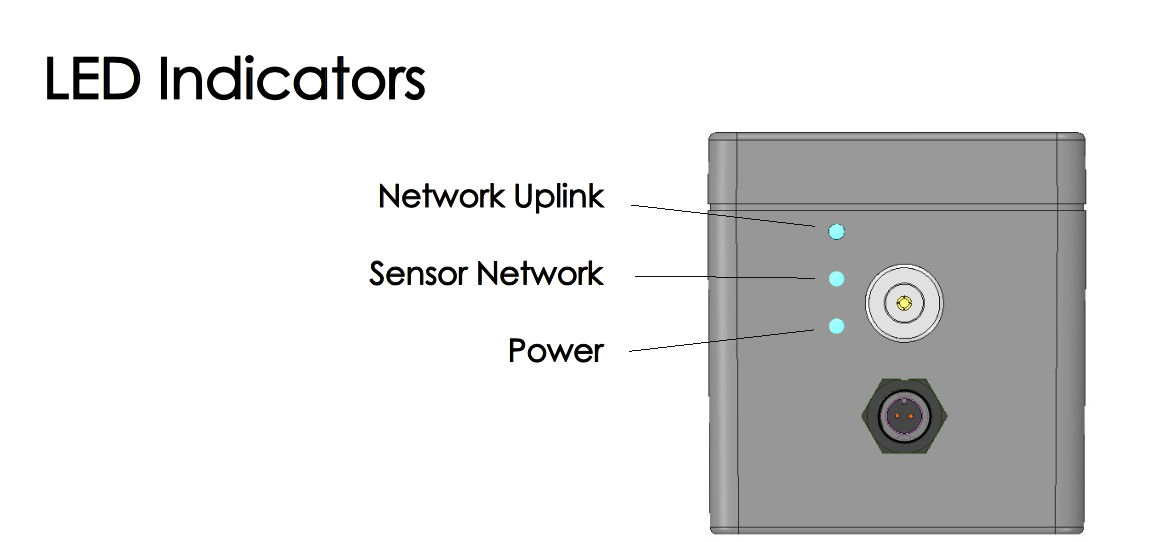
Outdoor Gateways (white boxes, mszgo) have leds on the side of the antenna, from top to bottom: Uplink LED, Sensor LED and Power LED).
MSNP1 / MSNP2 / MSNP4
With the microphone pointing to the right: Power LED, Sensor LED, Uplink LED.

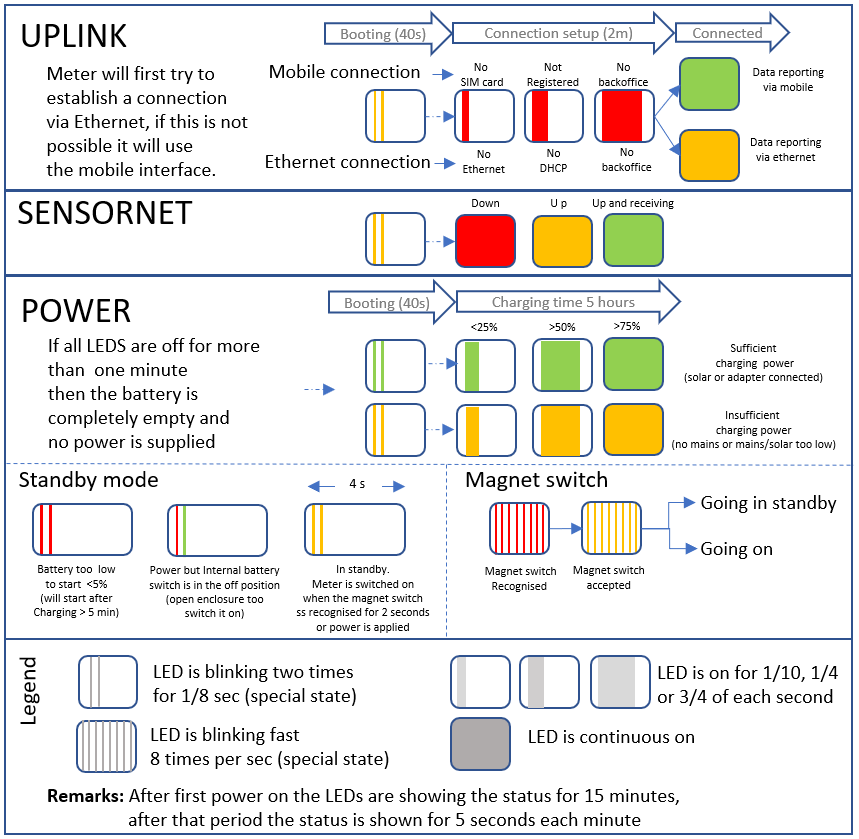
New LED behavior as of August 2019
As of August 2019 we have changed the way the LEDs behave. Please refer to the image below.
Important note: after first power on the LEDs are showing their status for 15 minutes. After that period the status is shown for 5 seconds each minute.
Older behavior prior to August 2019
Network Uplink
| Color | Off | 1/8s | 1/4s | 1/2s | Continuous |
|---|---|---|---|---|---|
| Red | 99 | ||||
| Orange | 99 | 1 | 2 | 3 | 4 |
| Green | 99 | 5 | 6 | 7 | 8 |
| Status | Phase | Medium |
|---|---|---|
| 1 | Internet connection | Ethernet |
| 2 | Tunnel ok | Ethernet |
| 3 | Backoffice reachable | Ethernet |
| 4 | Queue activity | Ethernet |
| 5 | Internet connection | HSPA/LTE |
| 6 | Tunnel ok | HSPA/LTE |
| 7 | Backoffice reachable | HSPA/LTE |
| 8 | Queue activity | HSPA/LTE |
| 99 | No Pi activity | either |
Sensor Network
| Output | Description |
|---|---|
| Color - Red | ZigBee network down |
| Color - Orange | ZigBee network up |
| Color - Green | ZigBee incoming data |
| Flash - 1/8s | Queue empty, no new data |
| Flash - 1/2s | Queue filling, not sending to backoffice |
| Continuous | Queue flowing to backoffice |
Power LED (only for outdoor gateways)
This LED will only light up when the gateway is just being switched on. It will turn off after a couple of minutes.
| Output | Description |
| Solid color Green | Battery full, mains high enough to charge |
| Solid color Orange | Battery full, mains too low for charging |
|
Blinking color Red/Orange |
Battery almost empty, mains too low for charging. Possibly not connected to mains power, try replacing your adapter if the gateway is plugged in. |
0 Comments